
You should consider that macOS updates can improve the stability, performance and security of your Mac, and they have updates for Safari, iTunes and other apps that are part of macOS.
Try to get updates for macOS Mojave or later
If you’ve upgraded to macOS Mojave or later, these steps will help you to keep it up to date:
- Select System Preferences from the Apple menu , then click Software Update to check for updates.
- In case any updates are available, click the Update Now button to install them. Or click "More info" to see details about each update and select specific updates to be installed.
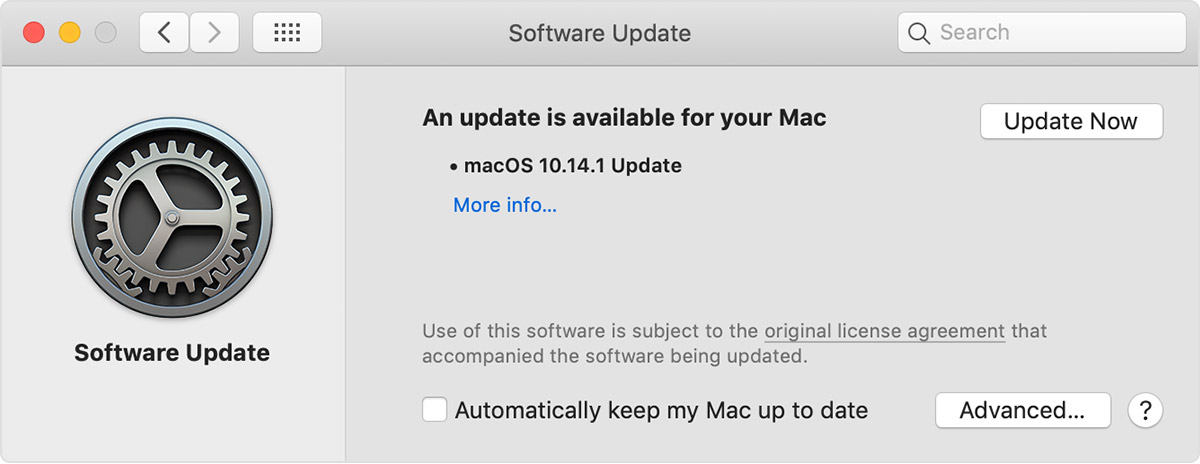 3. When Software Update says that your Mac is up to date, the installed version of macOS and all of its apps are also up to date. This story includes Safari, iTunes, Books, Messages, Mail, Calendar, Photos and FaceTime.
In order to find updates for iMovie, GarageBand, Pages, Numbers, Keynote and other apps that were downloaded separately from the App Store, open the App Store on your Mac, then click the Updates tab.
For installing macOS updates automatically in the future, like apps that were downloaded one by one from the App Store, select "Automatically keep my Mac up to date". Your Mac will alert you when updates require it to restart, so you can always select to install those later.
Here you will update for earlier macOS versions
If you’re using an earlier macOS, such as macOS High Sierra, Sierra, El Capitan or earlier,* these steps will help you to keep it up to date:
- Open the App Store app on your Mac.
- Click Updates in the App Store toolbar.
- Use the Update buttons to download and install any updates listed.
- When the App Store shows no more updates, the installed version of macOS and all of its apps are up to date. That includes Safari, iTunes, iBooks, Messages, Mail, Calendar, Photos and FaceTime. Later versions may be available by upgrading your macOS.
In order to download updates automatically in the future, choose Apple menu > System Preferences, click App Store, then select “Download newly available updates in the background”. Your Mac will alert you exactly when updates are available to install.
* If you’re using OS X Lion or Snow Leopard, get OS X updates by choosing Apple menu > Software Update.

MacBook Repair at TopTek System
TopTek System (TTS) is an Apple Authorized Service Provider. All of our technicians receive Apple training and they deliver the same high-quality service with genuine Apple parts and the proper tools, which provided and recommended by Apple, to open and close the device therefor the repairs are backed by Apple. Genuine Apple Parts are critical to a quality repair. Visit us to make sure you get your product back working the way it should.
To get service for your MacBook, you can call us or make a reservation online.
There's no charge if your Macbook issue is covered under warranty, AppleCare+, or consumer law.
Not sure if you're covered? Check your coverage by entering your Macbook serial number.
Most common MacBook Air/MacBook Pro Repair Services:
- LCD /Screen Replacement
- Logic Board Replacement
- Battery Replacement
- Water Damage
- Keyboard Replacement
